Monday, 20 June 2011
Evaluation
All in all I really liked parts of this project like looking at line art but unfortunately I lost a lot of my files when my college USB broke so even though some parts ended up better then their old versions some were not a good. Looking back I'm rather proud with my results and character design and if I had to do the project again I would have spent far more time on the graphics's side and maybe done something cuter or that I would personally like as the target audience of my game are young boys and I know nothing about young boys really.

Map
For my game I decided to make a map with the stuff I learnt from looking at road signs. I decided on a total of 8 enemy area's in total marked with red dot's (I chose the colour red because it's often associated with anger) and one home point (marked with blue, a calmer colour). The main parts on the map are marked with simple symbols, for example a blue strip for a river, brown lines for the log tent and patches of dark and green for the woods. The only bid I don't like is the dried up river bed which isn't very easily recognised


Road signs

Today we looked in detail at road signs as they're a good example of simple images that even with not much detail can convey their meaning. The meanings are conveyed in a number of ways, the use of colour as well as simple shapes that represent things such as roads helps a great deal and also the use of a few choice words that can be read and understood at first glance. Some of the shapes are very very simple for example a triangle with an arrow pointing downwards immediately gets the idea of a slope across even though a hill is not shaped like that, that's the whole point, trying to find a compromise between realism and simple symbols.
Screenshots
For these screenshots I used reference from my character sketch and coloured it in in block colours with clean lineart. I then moved the file (saved as a PNG) to the background images open in photoshop and made a shadow by duplicating the layer, turning it black then using transform > distort to place it behind and to the right and finally setting the layer mode to overlay and lowering the opacity. This still looked a little out of place so I added a new layer with a clipping mask above the troll and made a shadow with the pen tool in black then set it to the same settings I used for the shadow, this made him look a little less out of place.

This was my first version but then I came up with the idea to simplify the background so I used the filter 'cutout' and it looked a lot better.


I really like how these images have turned out as using cutout not only simplify the background but it brought out more browns and darker green's which complimented the colours of the troll and also gave it a darker feel.
Character design Enemy Troll

This is my design for an enemy troll, at first he was bald but I decided hair made him look wilder, I then gave him the weapon of a bat with spikes instead of my original ideas of an axe because an axe would be too bloody. I also had some trouble choosing a colour scheme but in the end I went with the one on the left because it's higher contrast and more exiting.
Closeup art.
Today we started on reproducing certain parts of a plan, bug and animal three times but instead I did three plants, three animals and three bugs instead for more variety.

I like making these images and I really like some of the aspects I draw, for example the shiny skin from the frog, the feathers from the hawk and the shading on the berry, I fully intend to use stuff that iv'e learnt from this exercise, especially the frog's skin.
Artist research
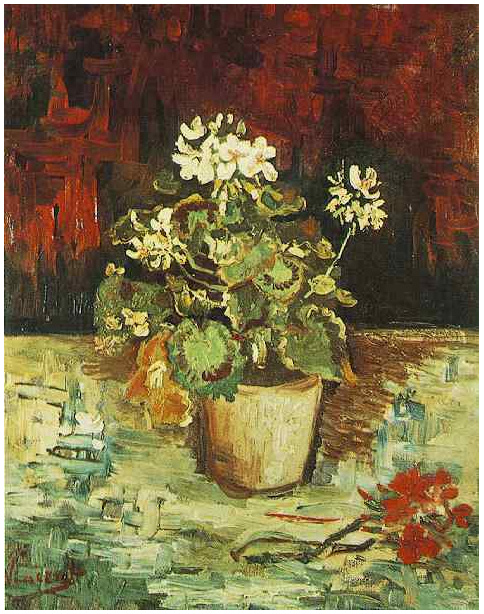
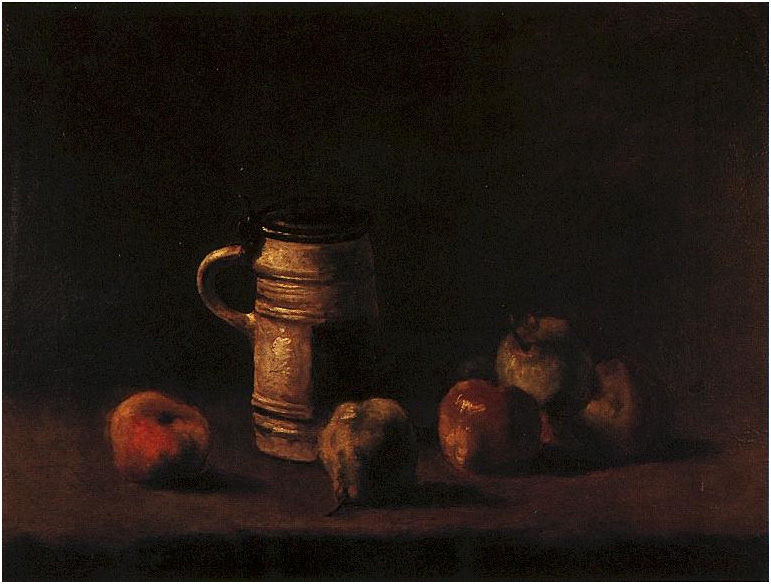
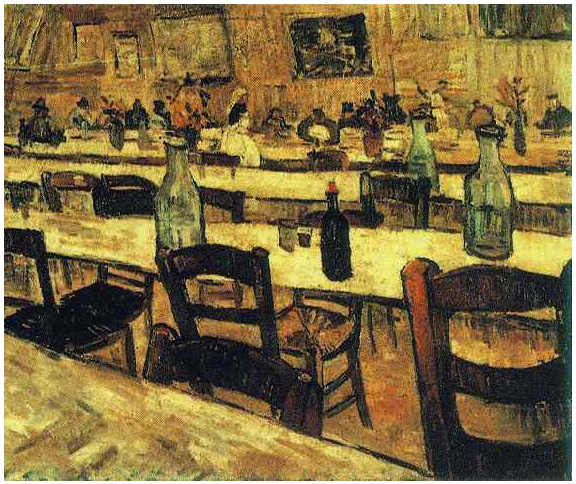
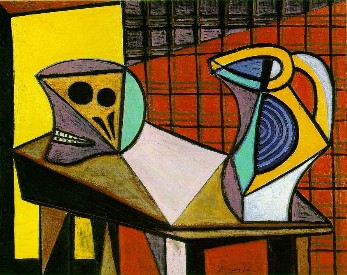
The two artist's I decided to research are Vincent Van Gogh and Pablo Picasso and the way they incorporate and present everyday objects in their art. Gogh's art is mostly landscapes but sometimes he has objects like flowerpots, chairs, tables ect. in his artwork. These things look natural there and stay in the style of everything else so they look part of the picture, Picasso does a similar thing where he carries his theme not only to characters and backgrounds in his art, but props and such as well, giving the whole picture a good 'feel'.





Lineart

This is the first example of lineart I found, it's very simplistic and clean and made up of simple shapes, it wouldn't be much of a challenge to colour in. the lines are also all one size which add's to the simple bold look associated mostly with children's art as it is very easy to tell that this is a dolphin as well as the over exaggerated expression makes it easy to see how the dolphin 'feels'.

This lineart is far more realistic and detailed, there's also a good variation in line with which makes things like her lips and eyes stand out. It looks like it's been traded over an photograph but it still makes a good lineart as although some of the detail and the shading had to be remove it's still recognisable. The expression is a lot more human as well which adds to the realistic look, but, in my opinion there should be far more definition on the eye's and less on the eyebrow's which overshadows the eyes a lot being the thickest lines there. It would look a million times better with lines around the edge of the eyebrow instead, not blocked in, and the lower eye lashes drawn in to push the eyes forward.

This example is far more simplistic than the last and far more dramatic. The lineart doubling as shading really makes the image stand out with the high contrast and give the image a really dramatic feel. Unlike the first two images this has a lot of straight jagged lines which again adds to the feel.

This lineart is slightly more detailed as it is of a human being instead of a machine, it's still not as detailed as the realistic lineart but it's bold and easy to workout whats what. The line thickness doesn't really change that much and things like hair and cloths hardly have any lineart at all which is understandable as it's lineart for a cell shaded anime image where only really important folds in cloth and such are shown. The image has good impact though with the extra thickness around the eye's and edges which make the image a lot less 2D.

This image is probably the most detailed even though it's still anime style. The line thickness doesn't change much but it's okay as it's a calm themed image, and where the line doe's thicken/thin it's very effective, as like in most anime images the eyes are the main focus having the thickest lines, this looks really nice although with all the detail on the cloths it would be nice if they were a bit more detailed.
Subscribe to:
Comments (Atom)